
We use cookies and analytics to improve your experience. By clicking "Accept", you consent to our use of cookies. Learn more

    🔁 Lifetime Support Downloads
    Numerical Innovations
    Order Now

    ACE 2D/3D Translator - CAD Conversion Tool

    Convert any file you're given — without rebuilding or losing time.

    Comprehensive file conversion solution designed for electronics engineers, CAD designers, mechanical engineers, and manufacturers who need seamless, accurate translation between 2D and 3D CAD formats.

    ⭐ "Conversion takes only seconds
 we offset 60% of cost in weeks."

    Management Summary: Why ACE 2D/3D Translator Pays for Itself

    A 1-page, non-technical overview for managers, procurement, and leadership.

    📄 Download Management Summary (PDF)
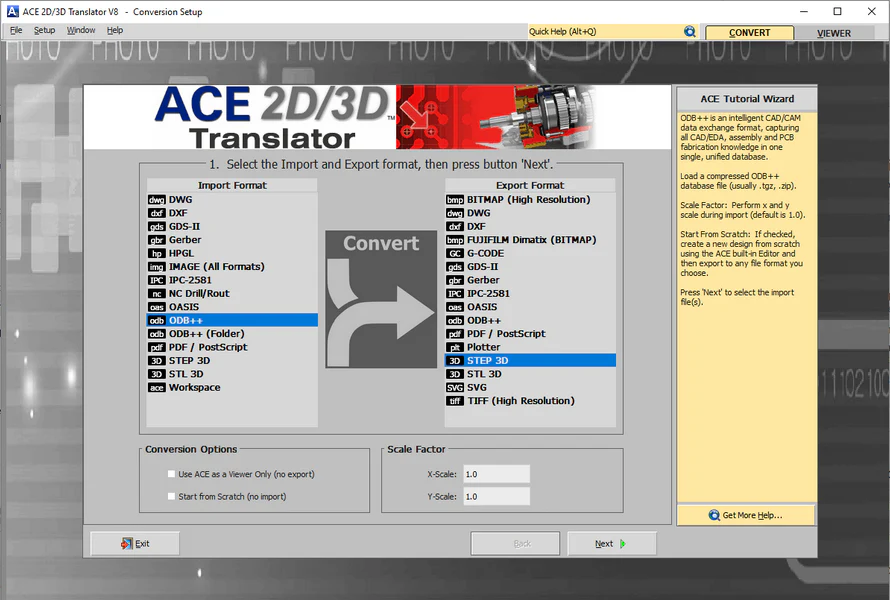
    ACE 2D/3D Translator Interface showing CAD and electronic design conversion capabilities

    From CAD Data to Manufacturing-Ready Output — Fast

    Step 1

    Import CAD / Gerber / ODB++ / IPC-2581

    Step 2

    Convert Between Formats

    Step 3

    Generate 2D / 3D Outputs

    Step 4

    Validate & Review

    Step 5

    Send to Manufacturing or Design

    Who Uses ACE 2D/3D Translator

    Electronics Engineers

    Convert electronic design data into usable formats for manufacturing and collaboration

    Mechanical Engineers

    Generate 3D models from design data for fit and enclosure validation

    Engineering Teams

    Standardize file formats across teams and tools

    Why Engineers Use ACE 2D/3D Translator

    Convert between multiple CAD and electronic design formats quickly
    Eliminate manual rework and data recreation
    Improve collaboration between ECAD and MCAD teams
    Generate accurate 2D and 3D outputs

    What Can You Convert?

    AutoCADGerber
    GerberSTEP (3D)
    ODB++3D Model
    IPC-25813D Model / Manufacturing Outputs
    Design DataMechanical Formats
    DXF / DWGGerber / GDSII

    Explore Full Conversion Capabilities

    ACE 2D/3D Translator supports a wide range of CAD, electronic design, and manufacturing formats—far beyond the examples shown here.

    View all supported formats and workflows →

    Before vs After ACE 2D/3D Translator

    Before

    Manual file conversion and rework
    Multiple tools for different formats
    ECAD and MCAD teams out of sync
    Slower design-to-manufacturing handoff

    After

    Automated, accurate format conversion
    One tool for 150+ formats
    Seamless ECAD-MCAD collaboration
    Faster release to manufacturing

    Complete Design-to-Manufacturing Workflow

    Design Files (AutoCAD, DXF, DWG, ODB++)
    ACE 2D/3D Translator→Convert to Gerber / 3D Models
    FAB 3000→Validate, Edit & Prepare
    Manufacturing

    From design data to manufacturing-ready output, ACE 2D/3D Translator and FAB 3000 work together to streamline your entire engineering workflow—making conversion, validation, and preparation faster and more efficient.

    Why ACE 2D/3D Translator is Essential for Engineers

    Design is only half the journey—manufacturing success makes your product real. ACE 2D/3D Translator bridges that gap by converting your CAD data into clean, production-ready formats in minutes. Engineer + ACE = fewer redesign loops, smoother CAM handoff, and faster time-to-manufacturing. ACE isn't just a converter—it's a force multiplier for accuracy, consistency, and profitability.

    Key Features of ACE 2D/3D Translator

    Professional CAD and electronic design file conversion with comprehensive format support

    Bi-Directional 2D/3D Translation

    Convert between 2D design formats (Gerber RS-274X, Gerber X2, ODB++, IPC-2581, DXF, DWG, GDSII) and 3D mechanical CAD formats (STEP, IGES, STL)

    Comprehensive Format Support

    Import and export industry-standard electronic design files and mechanical CAD formats for seamless ECAD-MCAD workflow

    Accurate 3D Modeling

    Generate precise 3D models from 2D design data including board outline, copper layers, components, and silkscreen

    ECAD-MCAD Collaboration

    Bridge the gap between electrical and mechanical design teams with reliable file conversion

    Extensive 3D Component Library

    Access thousands of accurate 3D component models for realistic board representation

    Batch File Processing

    Convert multiple design files efficiently with automated batch conversion capabilities

    Layer Control

    Selective layer export for customized 3D model generation

    Board Thickness & Stackup

    Accurate representation of board stackup and thickness in 3D models

    Video Tutorials - Learn ACE 2D/3D Translator

    Watch our comprehensive video tutorials to learn how to use ACE 2D/3D Translator for CAD and electronic design conversions

    ACE 2D/3D Translator Overview

    Get a complete overview of ACE 2D/3D Translator and its powerful features for CAD and electronic design file conversion.

    DXF/DWG to Gerber, GDSII, and Other EDA Formats

    Learn how to convert DXF and DWG files to Gerber, GDSII, and other EDA formats using ACE 2D/3D Translator.

    Generate High-Resolution TIFF and BITMAP Files

    Discover how ACE 2D/3D Translator can generate high-resolution TIFF and BITMAP files up to 25 million DPI for exceptional quality output.

    Convert Entire PCB Gerber to STEP

    Step-by-step guide on converting complete Gerber files to STEP format for 3D mechanical CAD integration.

    Convert Postscript File to 3D STEP

    Learn how ACE 3D can convert Postscript files from Adobe Illustrator to 3D STEP format for integration into complex designs or 3D printing.

    Convert Drill to Gerber

    See how to convert drill files to Gerber format using ACE Translator for seamless design-to-manufacturing workflows.

    Explore our complete collection of ACE 2D/3D Translator tutorials and training resources

    View Full Video Library

    Access Everything with One Subscription

    Get full access to all Numerical Innovations tools through Numerical Cloud.

    View Plans & Pricing

    Frequently Asked Questions (FAQs)

    Ready to Get Started?

    Experience seamless file conversion between 2D and 3D formats for your electronic design workflows. Download our free demo and start converting your CAD data today.

    ⭐ "We can now move between design formats without losing time or accuracy."