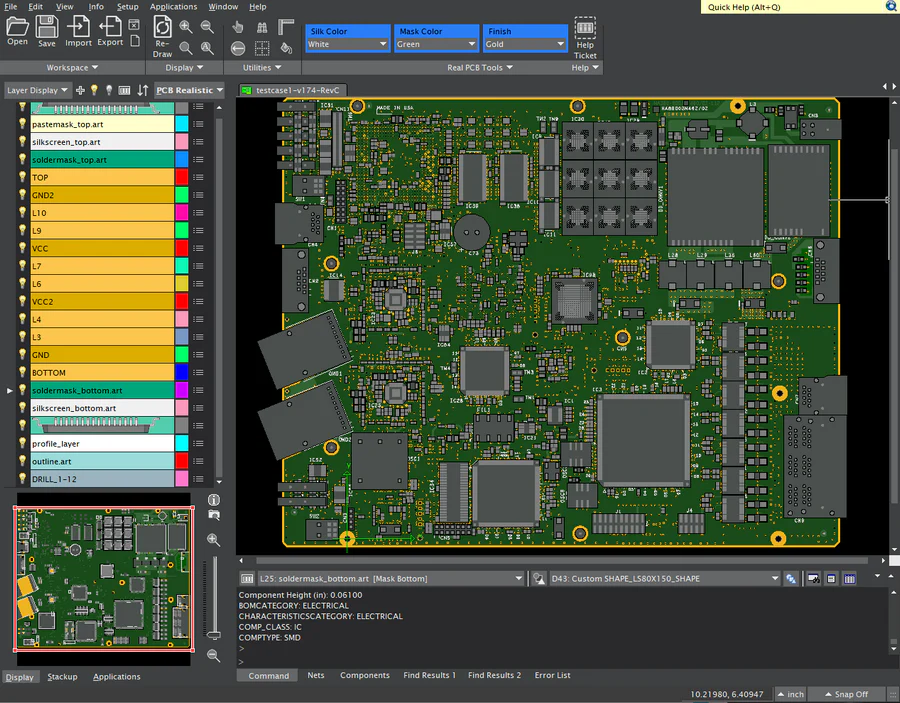
FAB 3000 - Professional CAM / Gerber Editor and DFM Software
The Industry-leading solution for PCB designers and manufacturers to view, edit, and analyze Gerber files with precision and ease.
We use cookies and analytics to improve your experience. By clicking "Accept", you consent to our use of cookies. Learn more
The Industry-leading solution for PCB designers and manufacturers to view, edit, and analyze Gerber files with precision and ease.

Every engineer knows: design is only half the journey. Manufacturing success is where your product becomes real. FAB 3000 bridges that gap instantly — taking your Gerbers from "design complete" to "production-ready" in minutes.
When you combine Engineer + FAB 3000 → you eliminate guesswork, prevent costly shop delays, and dramatically accelerate time-to-manufacturing.
FAB isn't just another tool — it's the multiplier that makes your engineering output more accurate, more consistent, and more profitable.
Low Cost Subscription — Cancel Anytime
Multi-Format Support: Work seamlessly with Gerber, ODB++, IPC-2581, and other industry-standard formats
Advanced Editing Tools: Modify, optimize, and repair PCB designs with professional-grade CAM tools
DFM Analysis: Identify and fix manufacturing issues before production
Panelization: Create efficient panel layouts to maximize production yield
NC Drill Optimization: Optimize drill files for faster, more efficient manufacturing
Netlist Comparison: Verify design integrity with comprehensive netlist analysis
Discover the complete range of capabilities that make FAB 3000 the industry standard
Watch our comprehensive video tutorials to learn how to use FAB 3000 for PCB verification and modifications prior to PCB manufacturing.
Discover the top 10 features in the new FAB 3000 V8 release that will enhance your PCB design workflow.
Learn how to achieve 33% better efficiency on your PCB panels with smart panelization techniques.
Perform comprehensive DFM checks on Gerber files and automatically generate professional PDF reports.
Create Pick-and-Place centroid files directly from your Gerber data for automated assembly.
Learn how to use FAB 3000 to create and edit Gerber data with professional-grade CAM tools.
See how to align individual layers using FAB 3000's Align Layers command for precise layer registration.
Explore our complete collection of FAB 3000 tutorials and training resources
View Full Video Library
Get All Desktop Software Tools for one low price!
Up to
1
User
Up to
5
Users
Up to
10
Users
Receive a single Activation Code that runs our desktop software products, anywhere worldwide, across unlimited computers. Get full access to the latest releases plus technical support, on a low-cost subscription basis. Numerical Cloud is the perfect cost-effective solution for individuals, corporations, and universities.
* Ready? Subscribe Now and instantly receive an email with your new activation code plus all software download links.
Experience the power of professional CAM software. Download our free demo and start running verification checks on your PCB designs today.