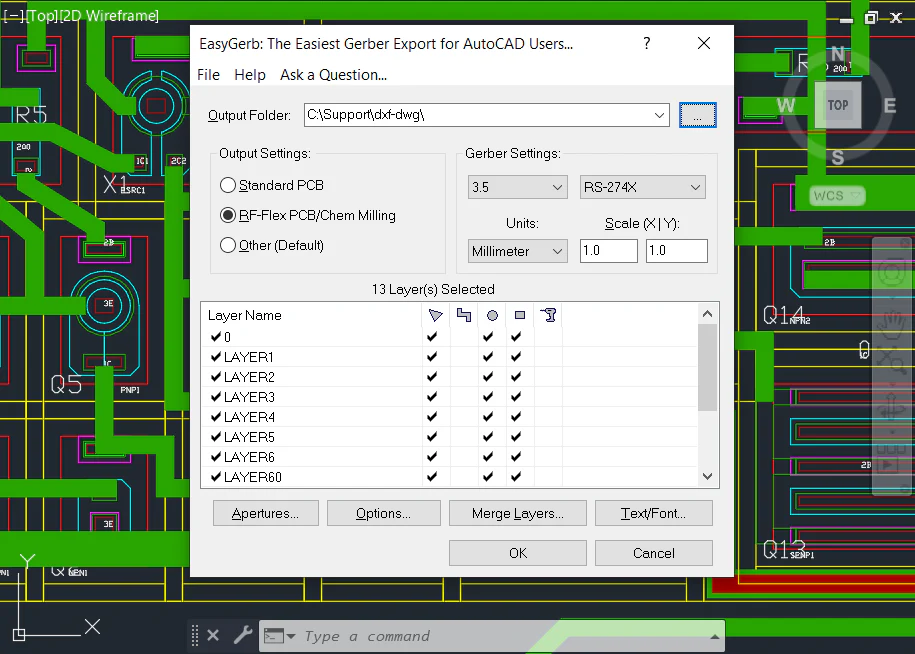
EasyGerb for AutoCAD
Instant Gerber Output from AutoCAD
EasyGerb for AutoCAD is a comprehensive Gerber exporter solution designed for PCB designers, electronics engineers, and manufacturers who need seamless integration of Gerber files directly within their AutoCAD environment.

Why EasyGerb is Essential for Engineers
Design is only half the journey—manufacturing success makes your product real. EasyGerb converts your AutoCAD drawings into clean, production-ready Gerbers in minutes. Engineer + EasyGerb = fewer redesign loops, smoother CAM handoff, and faster time-to-manufacturing. EasyGerb isn't just an export—it's a force multiplier for accuracy, consistency, and profitability.
Why Wait — Buy EasyGerb Now!
Low Cost Subscription — Cancel Anytime
Annual Subscription $50/month
Paid Annually
Monthly Subscription $75
Paid Monthly
Key Features of EasyGerb
Professional Gerber export directly within AutoCAD
Native AutoCAD Integration
Runs directly inside AutoCAD - no need to switch between applications or export/import files
Instant Gerber Export
Export Gerber files directly from AutoCAD in the time it takes to make a DXF file
Selective Entity Conversion
Use AutoCAD's powerful selection tools to choose exactly which entities to convert
Comprehensive Format Support
Export to Gerber RS-274X, Gerber X2, and other industry-standard PCB formats
Smart Object Selection
No need to select title blocks or reference lines - only convert what you need
Easy Configuration
Simple, intuitive interface for configuring conversion options and settings
Fast Processing
Lightning-fast conversion speeds that save you time on every project
Professional Quality Output
Generates production-ready Gerber files suitable for photo-plotters and board shops
How EasyGerb Works - 3 Simple Steps
Convert AutoCAD to Gerber in minutes
Load and Configure EasyGerb in AutoCAD
Load EasyGerb inside AutoCAD using the "appload" command. The intuitive configuration screen lets you select which layers to convert to Gerber format and customize conversion settings.
Select Entities for Gerber Conversion
Use AutoCAD's powerful selection tools to choose exactly which entities to convert to Gerber files. EasyGerb's selective conversion feature lets you exclude non-essential objects.
View and Export Production-Ready Gerber Files
Once conversion completes, a detailed report displays entity count, file locations, and warnings. Instantly preview your Gerber files with the integrated FAB 3000 viewer.
Video Tutorial - Learn EasyGerb
Watch our comprehensive video tutorial to see EasyGerb in action
EasyGerb for AutoCAD
Learn how to export Gerber files directly from AutoCAD using EasyGerb's intuitive interface and powerful features.
Explore our complete collection of EasyGerb tutorials and training resources
View Full Video LibraryWho Uses EasyGerb?
EasyGerb for AutoCAD is trusted by PCB designers, mechanical engineers, product designers, electronics manufacturers, and engineering teams worldwide. Whether you're designing consumer electronics, industrial equipment, or aerospace systems, EasyGerb provides the professional-grade Gerber exporter tool you need.

Numerical Cloud Subscriptions
Get All Desktop Software Tools for one low price!
1-Person
Up to
1
User
5-Person Team
Up to
5
Users
10-Person Team
Up to
10
Users
Receive a single Activation Code that runs our desktop software products, anywhere worldwide, across unlimited computers. Get full access to the latest releases plus technical support, on a low-cost subscription basis. Numerical Cloud is the perfect cost-effective solution for individuals, corporations, and universities.
Numerical Cloud: Get All Desktop Software Tools for one low price!
* Ready? Subscribe Now and instantly receive an email with your new activation code plus all software download links.
Frequently Asked Questions (FAQs)
Ready to Get Started?
Experience seamless Gerber export directly from AutoCAD. Download our free demo and streamline your PCB design workflow today.